For a step-by-step workflow, read Set up your first project. For current provider support, consult Capabilities; this chapter describes reviewed surfaces and their limits.
Chat
Select a project and open Chat to send prompts, choose agent/account/model and inspect streamed replies, tools and attachments. A split layout can hold independently configured panes. Each Chat strip can contain several chat and file tabs. Use its + button for a new conversation in that pane; Command–T targets the primary pane. A tab can move between panes of the same project while keeping its conversation identity; pending tool confirmations and unsaved file edits must be resolved first. Moving the last tab creates a fresh source chat. Closing the sole tab preserves its conversation and follows Last chat tab fallback. The original chat can be reordered or closed like its siblings without changing its conversation identity during a reorder. Closing any busy chat with siblings asks before stopping its turn; save dirty files and resolve conflicting composer drafts before closing those tabs.
Open the composer’s agent and model selector for Agent, Profile, Model and provider-supported Effort. For Claude, Codex and Gemini, Profile choices remain available while the current account is default; there is no second Profile selector. Effort uses a stepped slider with a provider-default choice, and describes requested configuration rather than provider-reported effective effort. The same selector’s Thinking section offers Show thinking updates. It changes the existing appearance preference for available thinking updates in all chats; it does not turn model reasoning on or off. Permission mode and automatic continuation retain their existing menu actions. The footer groups attachment, / commands and the icon-only Loadout control on the left, with Send or Stop on the right. Session info remains in the command menu. When available, the wide composer shows a labeled Weekly quota value; compact widths hide that separate weekly control. Chat telemetry labels its own measure as Context, Turn spend or Cost. Hover either control to read its visible measure first, followed by the provider's session and weekly quota breakdown where available. Open Chat telemetry for quota details, text size and Find in conversation; unavailable quota evidence is not zero usage. Chat tabs use plain target captions. For example, a tab can show Codex Sol while its composer shows Codex GPT-6.1-Sol · High. The composer names the requested reasoning level; the tab’s hover card retains session detail, while accessibility descriptions preserve the model and requested effort. A requested account switch waits until an active turn ends; the selector retains running and queued Profile information. The Privacy control appears only for a checked preview with a non-default mode or warning; an absent control is not evidence that a privacy check passed. A refused request can show a separate privacy notice with recovery guidance.
Option–Tab and Option–Shift–Tab cycle chat tabs in the selected project’s primary pane. New extra chats start fresh; an empty extra chat offers Resume latest for its selected provider/account and refuses a latest session already held by another tab. Open the Chat telemetry popover and choose Find in conversation, or use Command–F, to search the current Chat, Project or All conversation scope. Command–F first uses the most recent click that still identifies a pane in that window, then the pane containing the focused control, then the pane under the pointer. A click in a toolbar or outside the panes does not override valid pane focus. Chat and Roadmap retain their existing search; the other supported project panes focus their local filter or Find. A selected .md or .markdown file tab uses read-only document Find with Previous/Next matches and Reload; other file tabs retain their editor’s Find behavior. See shortcut scope.
Boundary and recovery: Sending starts provider work and can spend quota. Native resume remains provider/account-owned; changing a model is not changing accounts.
Files
Browse project files and open a file in the configured Commandem tab, separate preview pane or external application. With no stored preference, file links use Commandem tab; existing choices remain in effect. Hidden and ignored files are controlled by Layout preferences. Resolve an attachment's actual path before handing it to another app.
Selected Markdown tabs display a bounded read-only preview from a regular file in the tab’s original registered project. Links and images stay passive; unavailable files and shortened previews are labeled. This does not change the inline Files source editor.
Find: While browsing Files, Command–F focuses the existing file filter. It ranks loaded relative paths and shows up to 200 results; this is the existing fuzzy filter, not a complete archive search. While an inline source editor is open, Command–F retains that editor’s native Find instead. Escape clears the file-filter query and leaves that field unfocused.
The visible Close button on a file or image preview returns to the captured prior secondary-pane layout. Replacement previews retain the first origin. Deliberately hiding the pane, explicitly replacing the secondary pane with a project, or applying a Saved View discards that return destination. This reviewed behavior is limited to the visible preview Close button; existing menu and shortcut whole-pane behavior is unchanged, and it does not certify indefinite chat-session retention.
Boundary and recovery: A link is not permission to execute a file. Notebooks and documents need a compatible installed handler; previews and edit support differ by file type.
Search
Search within the selected project's code and files. Use the project selection and query to scope results, then open the matching file and line.
Boundary and recovery: Project search is not Matrix retrieval or a global chat-history search. Generated and ignored files can change what is available.
Log
Inspect project log output and recorded activity while diagnosing a run or check. Match timestamps and run identity rather than inferring cause from neighboring rows.
Find: Filter the already loaded tail by case-insensitive line text. Earlier matching loaded lines can appear before the display cap; any remaining display omissions are labeled. Copy still takes the whole loaded tail. Find does not restart the reader; Escape or Close clears the filter.
Boundary and recovery: Logs can contain sensitive paths or tool output. Redact before exporting; absence of a row is not proof no action occurred.
Activity
Read the project's timeline of commits, runs and transitions. Use it to locate evidence relevant to a status change and then open the original record.
Find: Filter the loaded event text: displayed day, time and event name, plus project identity while All projects is enabled. Hidden exit codes and raw field names are not search text. The source window remains 200 observations; matching display omissions are labeled. Escape or Close restores the loaded feed without another read.
Boundary and recovery: Activity is observational. A notification dismissal does not erase historical activity or undo a commit.
History
Browse provider-session history available to the current project and account. Open the original session for inspection or choose a supported resume path.
Find: Command–F focuses the existing saved-session filter. It searches session titles, IDs and account labels within the current provider selection, not every saved turn’s body. Escape clears the query and leaves the field unfocused. Provider/archive availability remains a separate limit.
Boundary and recovery: Provider/account roots and working-directory mapping matter. An API endpoint does not automatically inherit native CLI archives.
Matrix
The internal tab identifier is graph; the visible product name is Matrix. Inspect conversation relationships and reviewed candidate context for this project, with source provenance.
Boundary and recovery: Related does not mean safe to inject. Review source scope, privacy posture and destination before a bridge is delivered.
Diff
Inspect repository changes against the relevant base before review or merge. Confirm the branch, base and dirty worktree as well as the rendered patch.
Find: Command–F opens raw view and focuses a local case-insensitive changed-path filter. It intersects the active intent lens and can include tracked and untracked paths; it does not search patch bodies. Escape or Close clears the path query while retaining any active intent lens; Show all files clears the lens. No-match is explicit and does not mean the worktree is clean.
Action scope: Stage all and Unstage all affect the full change set while a path filter or lens is active. Hunk actions apply the complete original hunk patch; uncertain path/header identity makes those actions unavailable. A displayed excerpt is not the full patch, and Unicode-path read support does not certify atomic whole-rename unstaging.
Boundary and recovery: A readable diff is not passing tests or authorization to land. Preserve unrelated user changes and never reset them to make a review easier.
Review changes before landing
Replace PROJECT with the exact project name. Confirm that its registered working directory is the worktree you intend to review.
Read-only inspection.
commandem diff PROJECTExpected result: The project's current diff, with likely secrets redacted. An empty diff is not a passing test, and reading it does not stage, commit or merge changes.
Shell
Open the selected project's terminal surface for commands. Confirm the working directory, account context and command before execution.
Boundary and recovery: Shell commands can write files, disclose secrets or spend quota. Do not copy diagnostic commands blindly from untrusted transcripts.
Config
Inspect the project manifest and declared commands/conventions. The manifest connects project behavior to CLI checks and orchestration.
Boundary and recovery: A configuration declaration does not prove the command is installed or safe. Review mutations and validate the resulting manifest.
Inspect a project's declared workflow
Replace PROJECT with the exact registered project name. This reads its manifest without applying a patch.
Read-only inspection.
commandem manifest PROJECT --jsonExpected result: Declared convention fields as JSON. Check command paths and project scope before invoking an action; absent fields are not invented defaults.
Stats
Inspect project-level activity and resource summaries as available from their data sources. Use underlying receipts when exact accounting matters.
Boundary and recovery: Observed, reported and estimated usage are different. Missing provider quota data must stay unknown, not zero.
Actions
Find configured project actions and run the intended operation after reviewing its scope. Actions use the project's declared workflow rather than an independent task system.
Boundary and recovery: An action can mutate or execute. Inspect the command and require the same approvals that an equivalent CLI call needs.
Roadmap
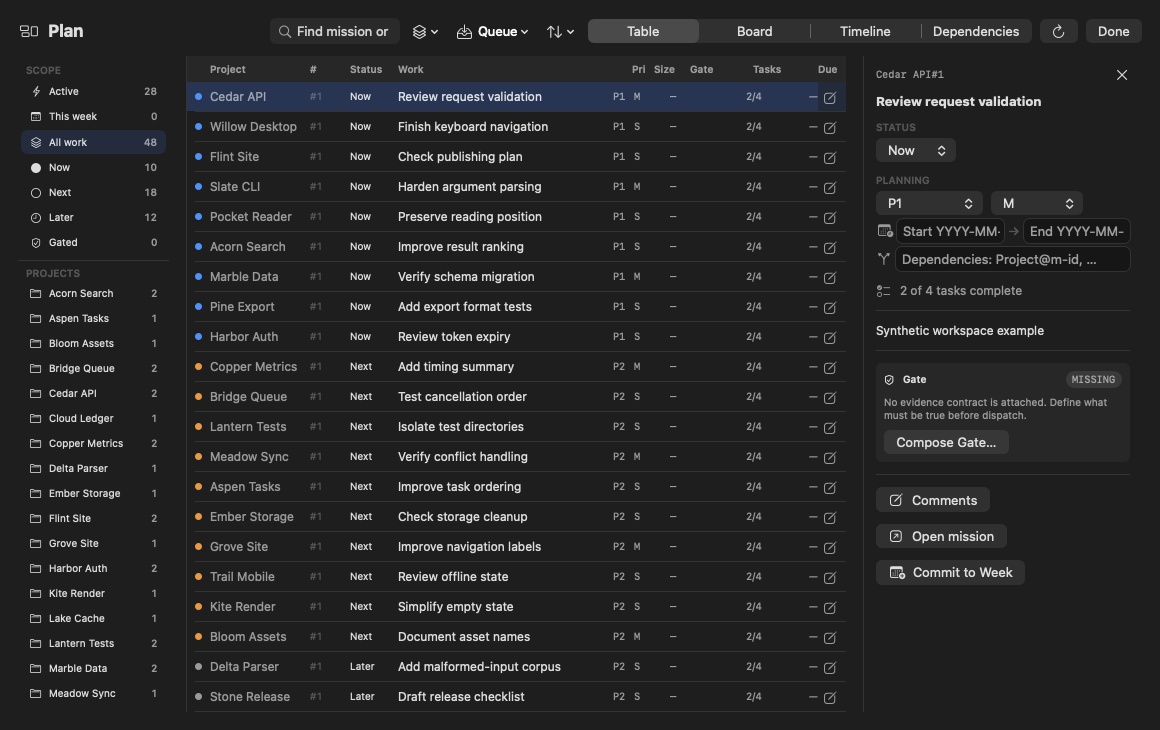
Browse Campaigns, Missions, executable tasks, dependency state and completion evidence in the project roadmap. Use durable Mission IDs in links or dispatch references. Plan explains Campaign, Mission and task scope.
Work on it prepares a chat draft containing the Mission reference and remaining task scope. Review and send the draft; preparing it does not start an agent.
When derived evidence is available, Roadmap rows show a five-position work track (Shape, Build, Verify, Land and Done) and a separate trust glyph. The selected Mission’s trust chip shows its recorded explanation on hover. Trust distinguishes verified, unverified, integrity warning, failed, ungated, legacy and unknown evidence separately from authored status. It does not re-run a check, authenticate a receipt or authorize a merge.
Find: Mission search includes loaded titles, notes, linked Campaign titles and rationale, Mission comments, stable IDs and task titles. Search shows bounded pages of at most 300 combined matches; Previous results and Next results reach every match. It switches Roadmap’s kanban to List. Clearing search restores the usual browse limits. Editing and dispatch retain the original Mission identity.
Boundary and recovery: A checked task is a claim, not verification. Completion needs locally verified evidence; a status update alone does not implement a feature.
In List view, Sort offers Workflow, Priority, Due date, Step and Recently updated. The choice is saved per project. Right-click a Mission or Campaign card to Pin or Unpin it; pinned cards display a mark. Pins are local owner view state rather than authored roadmap status. Workflow keeps the existing workflow order; a pin does not promise first position in every section or view.
Project news in Roadmap
Project news shows recent recorded updates for the selected project above its Missions. With enough pane height, news defaults to roughly half the available space; drag the divider to resize it. The row limit follows the committed section height, up to twenty. Each project's full Roadmap and Glance save separate resize preferences. The full Roadmap and its full or Glance companion use the same feed. These are recorded events, not an agent-generated summary. Reading them does not start provider work, mark Board messages read or acknowledge alerts.
Keep your place: after the initial successful load, changed snapshots wait behind Show latest updates while the displayed rows stay in place. Choosing it applies the waiting snapshot and returns only the news view to its top; Mission reading position stays in place. Receiving updates also preserves unsent task drafts in the full Roadmap and new-mission drafts in Glance. Refresh checks for another snapshot; Retry tries again when news could not open. Refreshing pauses when the window or pane is hidden. A visible window can keep reading while another window has keyboard focus.
In a short pane, View updates opens an updates popover. Very short panes omit the card to leave room for Missions. Select an update to inspect its recorded details. Open recorded source appears when a supported web source was recorded and opens it explicitly in the browser; Done closes the details.
Filter displayed rows: All, Features or Needs attention narrows which recorded events are shown; Show maintenance additionally dims routine maintenance commits while All is selected, or hides them when turned off -- it has no effect under Features or Needs attention, which are each already a single classification. Both choices persist across launches and change what is displayed, never which events are recorded.
Boundary and recovery: a failed refresh retains the last good updates and shows the failure state. This card contains recent retained activity, with no older-page control. The displayed row count never proves the end of history. The separate Activity tab keeps its own loaded timeline and Find behavior.
Read updates without moving your Mission reading position
Read-only inspection.
- Open a project's Roadmap, read a Mission and leave some Mission text selected.
- When Show latest updates appears, choose it deliberately; inspect the new news snapshot while keeping your Mission reading position.
- Select an update for its recorded details, then choose Done. Open recorded source is a separate browser action when available.
Expected result: after the initial load, changed news rows wait for Show latest updates. Applying them leaves the Mission reading position in place. If refresh fails, the previous updates remain visible with the failure state.
Find current Missions and durable references
Replace PROJECT with the exact registered name. This inspects structured Missions and any associated roadmap document, without changing status or task checkboxes.
News timestamps use relative time, with the absolute time available on hover. Unrecognized timestamp text remains visible. News significance filters use the current client classification; a decoded server field alone is not proof that the view consumes it.
Read-only inspection.
COMMANDEM_NO_ROADMAP_AUTOSYNC=1 commandem roadmap PROJECT --jsonExpected result: The current roadmap, including durable IDs where present. Reuse an actual ID rather than copying the illustrative m-xxxxxxxx placeholder. The prefix disables linked-issue autosync for this inspection. Normal roadmap reads can initiate configured synchronization; review its conflict policy before enabling it.
Board
Read and send project board messages. Board messages share unread indicators across Board surfaces; historical messages remain after being marked read. They are audit records, not human notifications or OS banners. Local Comments use a separate discussion thread.
Find: Filter loaded message blocks by their displayed sender, recipient, non-default kind, short timestamp or folded body. Hidden message suffixes cannot match. The History view filters displayed metadata and, only with Excerpts enabled under an admitted standard-privacy report, displayed bodies. Record links retain their original IDs and source selection. Filtering does not send, refetch or mark additional reads; Escape or Close restores loaded records.
Local matches do not change delivery or ACK evidence. Source coverage gaps and omitted matching records remain visible; this is not a complete messaging archive.
Boundary and recovery: Clear/read controls are not deletion. A synchronization adapter may be unavailable or require separate private-repository access.
Notes
Open this project’s private scratchpad to keep notes separate from transient conversation text. Reading, adding and clearing notes are separate actions; Find does not send or refresh them.
Find: Search within all loaded note text, using the match count and Previous/Next to select occurrences. Only a bounded excerpt around the selected match is rendered; longer occurrences are partly shown. Copy all loaded notes remains explicit when excerpted. Escape or Close clears and closes Find while preserving the unsent draft.
Boundary and recovery: Private Notes use the local project scratchpad. Local Comments, Board Messages and external adapter delivery have separate audience and storage contracts. Copying note text is an explicit action.
Links
Keep pinned project URLs discoverable for docs, dashboards and trackers. Pin writes the project’s local manifest; opening a URL uses its intended browser or handler.
Find: Filter complete loaded pinned URLs case-insensitively, including text beyond a shortened label. Results use bounded 32-link pages with Previous/Next; every loaded match remains reachable. Open and Remove retain the exact original URL, not a filtered row position. Escape or Close restores the loaded list; Find does not write the manifest or open a browser.
Boundary and recovery: Remote links leave the local app boundary. Access permissions, network availability and installed file handlers remain external requirements.
Current source boundaries
These are source-level boundaries reviewed against 8f06da03. They do not replace the dated source captions or screenshots elsewhere in this handbook, or certify installed-app, physical-input, device, provider or OS-permission behavior.
Chat recovery, selection and tab limits
A conservative interruption notice can follow observation of a surviving owned process from a prior app session; it is not proof that a turn crashed. Continue and Dismiss are manual choices. A transient reconnecting notice offers Retry now or Cancel separately from a quota hold; the notice alone does not prove the provider recovered.
Transcript options place text in the composer for review. In a multi-select block, checking or unchecking a box updates the current selection in the draft immediately, one option per line in displayed order, while preserving text outside that selection. Unchecking the last box removes the inserted selection. If an update cannot safely locate the previous selection, it keeps your text and shows a notice; a later selection can append a new block. The filled Send N selected control confirms the same draft selection, focuses the composer and clears the checks; review and send the message from the composer. A pending selection pauses automatic following; the configured scroll policy still applies afterward. Reader anchors and bounded scroll convergence reduce particular jumps, not every possible layout shift. A neutral tool-exit label still reports a failure, not success; blocked, denied and timeout outcomes retain their separate meanings. Thinking previews remain abbreviated, not a complete reasoning transcript.
Cross-pane tab dragging targets the receiving Chat tab strip of the same project, not any empty area of a pane. Protected drafts and pending confirmations can refuse a move. Closing a tab may succeed even when its preferences are too large to retain an undo entry: Undo Close Tab is bounded and best-effort. A secondary pane whose project is no longer available offers a close/reselect path rather than silently becoming a new project.
Read stored Notes is a separate reader
The Notes pane also offers Read stored Notes, a separate, explicit reader bound to the exact selected project. It does not turn the scratchpad into a Local Comment thread or grant Matrix, edit, synchronization or outbound-delivery authority. Incognito clears and blocks persistent Note reads; returning to an allowed mode requires Refresh. A stale or unavailable selector is not a verified-empty inventory.
Display limits and diagnostics
Roadmap task titles and comment previews have display limits (120 and 400 characters respectively), with bounded tooltips. Those limits do not truncate saved text or replace the search and pagination limits above. Optional COMMANDEM_TRACE_LINKS diagnostics can include URLs, selected text and drafts; keep such traces private. No automatic redaction or universal scrolling-performance guarantee is implied.