For a step-by-step workflow, read Dispatch bounded work with a meaningful gate. For current provider support, consult Capabilities; this chapter describes reviewed surfaces and their limits.
Plan
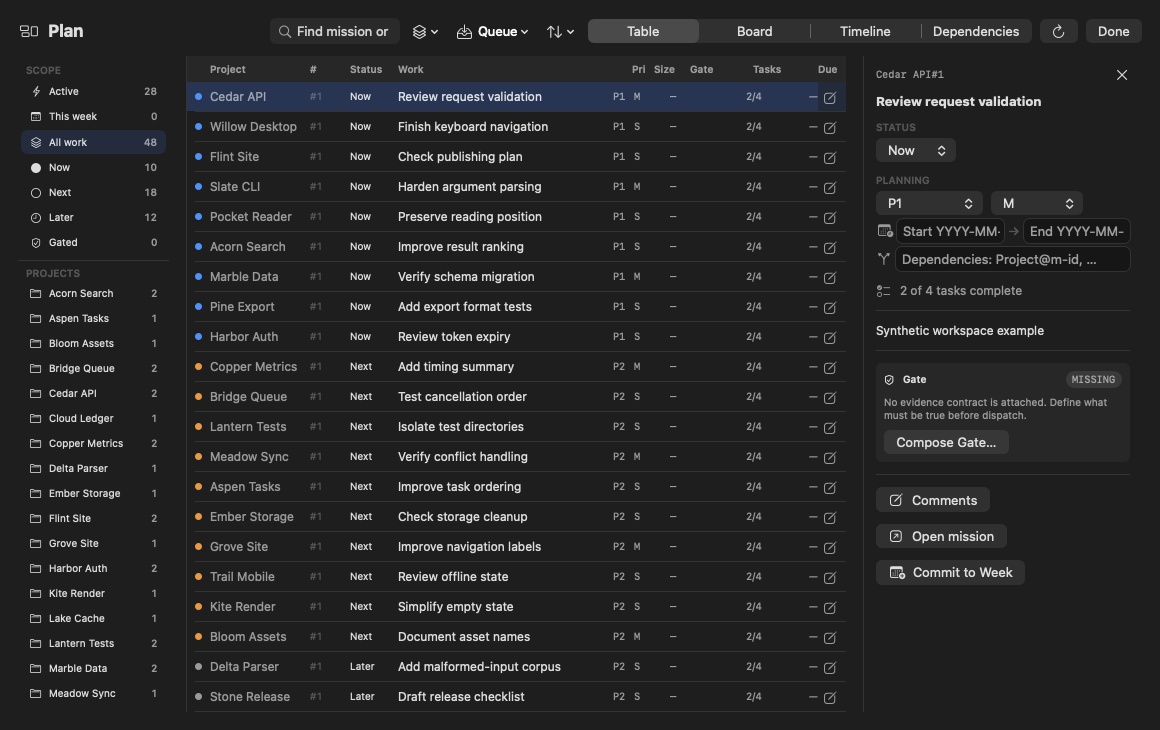
Open Plan in the palette to work across project roadmaps. Campaigns organize outcomes; Missions identify coherent work; tasks describe executable slices and dependencies. Research belongs in a Mission when it has a design and acceptance evidence.
The CLI can preview an Operation for exact Missions: repeat op plan --mission with project and durable Mission references, then request --json. Selection narrows existing opt-in; unresolved dependencies outside the selection are deferred, not added. The preview names its quota inputs and estimates, while actual routing remains resolved at dispatch. --stage saves the returned draft without starting agents. Authorization through op start remains separate, and dispatch requires --execute. See the Operation command reference.
Boundary and recovery: Keep a Mission current while implementing it. Do not confuse status now with evidence that a task actually ran.
- Campaign
Name an outcome spanning related work.
- Mission
Define a coherent deliverable with its durable reference.
- Task
Specify a bounded change and the evidence that accepts it.
Plan’s sort menu offers Workflow, Priority, Due date, Step, Recently updated and Manual (authored order). Its selection is shared across projects. Table rows and board cards offer Pin or Unpin from their context menu. Workflow retains its existing ordering. In this reviewed source, Plan’s Step option has no step key to compare; selecting it does not establish step-based ordering.
Preview one authored Task
sync planning --preview-task reads an exact Task from the registered project's authored roadmap and passes that immutable source to the common Planning preview. It requires the exact project name, durable Mission ID and durable Task ID. Titles, row positions, fuzzy project matches, duplicate identities and a Task belonging to another Mission are refused.
A request must set schema_version to 1 and contain local_project, mission_id, task_id, plus the reviewed binding, capabilities and operation. These descriptors are caller-supplied evidence, not a saved grant or a live provider permission check. A managed-block or property representation requires the exact bound parent remote object; a supplied child-object target must belong to the selected Task. Absent-target descriptive previews follow the common contract; they are not a live write grant.
Inspect a reviewed Task request
Prepare reviewed-task-request.json using the exact registered project and durable IDs, with an explicit mapping and capability descriptor appropriate to that Task. Do not guess a remote target or paste credentials. This flag requires a CLI build containing the reviewed implementation; confirm it with commandem sync planning --help.
Local read-only preview.
commandem sync planning --preview-task reviewed-task-request.json --jsonExpected result: A common preview and additive task_source. The latter names the selected Task source, exact parent identity, parent revision and separately named parent omissions. It does not disclose sibling Task text or parent comment bodies. The command reads the request and authored manifest; it does not edit the roadmap, save a binding, access the operations store, refresh credentials or capabilities, contact a provider or start a worker. Stdin --preview-task - accepts the same request. See the CLI workflow.
Task and parent guards are separate
expected_source_revisionoptionally checkstask_source.source.revision. Changing the selected Task's title, state, order or parent identity invalidates that Task revision.expected_mission_revisionoptionally checkstask_source.parent_revision. A parent comment change can invalidate this guard without changing the selected Task or common preview digest.- The common preview digest does not bind every parent Mission field or comment. Parent revision and omissions are separate read evidence, not Task fields, provider authorization or an apply-time reread guarantee.
Boundary and recovery: If either supplied guard is stale, reopen the source preview and review the change rather than deleting the guard to make it pass. Invalid requests and conflicting Planning modes refuse with diagnostics on stderr, not a successful JSON preview. This read-only seam does not deliver a remote update, reconcile conflicts or retire legacy tracker paths. Inspect Saved destinations separately from historical delivery evidence.
Preview the whole Mission plan
commandem sync planning --preview-mission-plan reviewed-mission-request.json --json routes an exact durable Mission’s fields, dates, design, dependencies and identified Tasks through the common projection in one bundle. Prepare the request using explicit binding/capability evidence and confirm the flag in the installed sync planning --help. Inspect proposed writes, relations, losses and deferred Tasks: the preview performs no provider write or roadmap edit. A declared blocking loss remains a refusal even when the preview digest is valid. A legacy issue-link change invalidates the Mission source revision without granting or inferring a remote target.
Week
Open Week for a weekly review of planned work and recorded progress. Use it to reconcile priorities and capacity across projects rather than dispatching from every status card.
Boundary and recovery: A summary is not a release decision. Check unresolved blockers, quota evidence and owner acceptance before committing to a schedule.
Agent runs and queue
Open Agent runs or Monitor to inspect queued, planning, awaiting-approval, executing and terminal work as exposed by the runner. Approve the exact planned run once and verify its branch and results independently.
Boundary and recovery: Done can mean a legitimate no-op, an interrupted run or a completed execution, depending on its evidence. Inspect the receipt and actual diff before closing the Mission.
Locate a run and its receipt
With Commandem installed, inspect the global queue first. Copy a real run ID when a later command requires RUN_ID.
Inspection with local run-state maintenance.
commandem queue --json
commandem queue --receipts --json
Expected result: Current run records and recent terminal receipts. Confirm provider/account, branch, stop reason and gate evidence. The full queue query reconciles stale local workers and can contact configured fleet nodes. Reconciliation can mark abandoned work failed or requeue a dead quota-waiting worker; an active runner can later pick up that recovered task. Receipt inspection is read-only. Neither command grants approval or directly starts a model turn. For a narrower local read, use commandem queue --run RUN_ID --json with an existing run ID.
Runner control
Open Runner control to inspect unattended execution. Bounded turn, budget and progress preferences constrain auto-continuation; they are not an instruction to pursue arbitrary work.
Boundary and recovery: Pausing work and resuming a chat are separate operations. A timeout must not leave descendants spending quota invisibly; inspect active ownership before cleanup.
Verification and Gate Composer
Compose evidence-backed checks and inspect preflight before applying changes. A shell verification command and a browser URL check can be combined; the browser gate requires HTTP success and rejects JavaScript exceptions or console errors.
Boundary and recovery: A screenshot alone is not a passing application test. Gates do not certify security, full functionality or all pages; missing evidence remains a failed or unknown check.
Inspect the project's gate catalog
Replace PROJECT with the exact registered name. Listing is different from preflight: it does not execute a declared control.
Read-only inspection.
commandem gate list PROJECT --jsonExpected result: Available contracts and their issues/readiness. A catalog entry is not evidence that a control ran or passed.
- Claim
State the deliverable and a meaningful acceptance criterion.
- Control
Run the declared check under the reviewed authority and resource bounds.
- Evidence
Inspect the actual result and limitations before accepting completion.
Run a small, reviewable deliverable
Use a repository you own, an authenticated named Codex account, and a policy appropriate to the task. Replace PROJECT and DEMO_ACCOUNT. Read autopilot's limits before confirming the launch.
Starts an agent and consumes provider quota.
commandem autopilot PROJECT \
  "Create docs/acceptance.md with an Acceptance heading and project-specific checks. Do not change existing code." \
  --agent codex --account DEMO_ACCOUNT --worktree --max-turns 3 \
  --verify 'test -s docs/acceptance.md && rg -q "^# Acceptance" docs/acceptance.md'
Expected result: A bounded agent attempt on a reviewable worktree, with a structural verification gate. Requires rg and consumes the selected account's quota. The check proves only a nonempty file with the requested heading, not criterion quality; inspect the receipt and diff before merging.
Run receipts
Receipt rows derive their trust glyph from recorded gate and project-test evidence. For done or verified stop reasons, the row distinguishes verification by project tests, verification by an outcome gate, a hollow check, a failed gate and no verification. Hover for the evidence category; a done stop reason alone does not establish verification.
Open Run receipts or the run detail for provider/account identity, execution results, gate evidence and failure reasons. Keep evidence links and redacted screenshots associated with their run.
Boundary and recovery: Receipts describe what was observed, not what should have happened. Redacted URL evidence can differ from the exact navigation URL to avoid retaining tokens.
For a causal timeline, inspect the run in Replay. For selected request context, open its context manifest.
Broadcast and announce
Command Center's Broadcast inlet scopes run/queue/goal actions across projects. Announce routes a message to active chats; it is a communication path, not permission to execute the message.
Boundary and recovery: Cross-project scope multiplies impact. Confirm recipients and distinguish an advisory board message from an approved dispatch.
Review, approvals and Git rollup
Use Peer review workspace, Tool approvals, Review inbox, Review & merge agent branches or Git across projects from the palette. Inspect requested tool authority, branch contents and verification before approving or landing.
Boundary and recovery: A review UI is not a substitute for workbench isolation. Refusing an approval or dismissing attention does not delete the underlying run.